OnlyFans PPV Pricing: How Much to Charge for a Photo or a Video
“How much should I charge for a PPV?” has no single answer, and a page that gives you one number is guessing about an account it has never seen. What does exist is a structure that holds on almost every page: a free teaser, cheaper photos, dearer videos, a price that rises with how explicit the content is and with how established the page is, and a floor that the platform itself sets. This guide walks through that structure, prints the starting bands OF.ai uses for a new page — category by category, photo and video separately, taken straight from the product — and explains how to test a price on your own account instead of borrowing somebody else's. Every number on this page is a starting point to adjust, not a forecast of what you will earn.
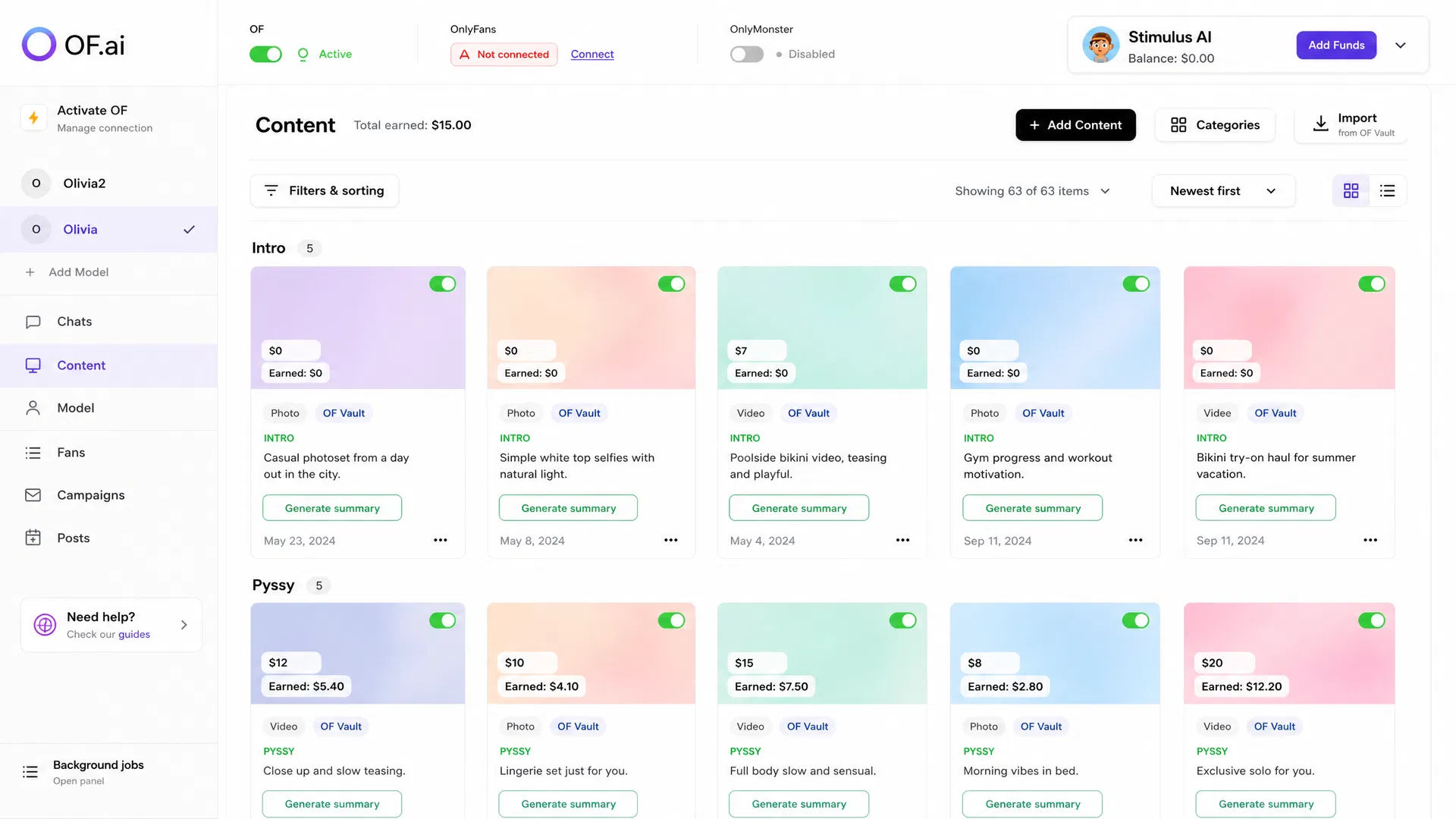
- The platform floor: OnlyFans does not carry a pay-per-view item under three dollars
- A price ladder from free teaser to photo to video, with the video band always on top
- OF.ai's starting bands per category for a new page, and how the page level moves them
- The common pricing mistakes, and a price test a second person could audit
The Short Answer
Price each file by two things at once: what is in it, which is its category, and what format it is, photo or video. A teaser that opens the conversation is free. A photo that stays dressed or in lingerie sits at the bottom of the paid range, a nude photo above it, a named act above that, and a video of the same thing above the photo. The whole ladder then moves up as a page grows, because a page with a paying core can ask more for the same content than a page that is still building an audience.
If you have no sales history yet, start low inside each band and raise prices once items sell, rather than starting high and waiting. A first sale at a modest price gives you both a reason and the evidence to raise it. A first offer nobody buys at a high price tells you almost nothing, because the price, the item, the timing and the fan are all suspects at once.
What a PPV Price Depends On
Most of a price is decided before the message is written. These are the inputs that move it, roughly in the order they matter on a new page.
- Category — how explicit the item is. A tease, topless, nude, a named act and another person in the frame are different products, and fans treat them that way.
- Format — a video takes more to make and gives more than a photograph of the same thing, so it belongs in a higher band. Length matters inside the video band.
- Page level — a newcomer, an established page and a page people arrive already looking for sell the same acts at different prices. That difference moves the whole ladder, not one category.
- Where the fan is in the conversation — an offer to somebody who subscribed an hour ago and an offer to a regular buyer are not the same moment, even at the same price.
- What he has already bought — offering an item a fan already owns, or something very close to it, fails at any price.
- The platform's own limit — the minimum below which OnlyFans will not carry a priced message at all.
The Floor: Nothing Paid Under Three Dollars
One number in PPV pricing is not a judgement call. OnlyFans does not allow a pay-per-view message priced under three dollars. A floor written below that line does not produce a cheap offer; it produces no offer, because the send is refused. If your price sheet has a band that starts at one or two dollars, that band is broken, not generous.
Free is a different thing and stays available. A teaser sent without a price is not a cheap item — it is the step before a sale, and in OF.ai the Intro category is free in every format by default for exactly that reason. Between free and the platform minimum there is nothing worth setting.
In OF.ai every paid starting band sits at or above the platform minimum at every page level, and a test in the product holds it there. A corridor you set yourself on the Categories screen takes whole dollars from zero up to one hundred; the numbers are yours, and the same reasoning applies — keep paid items at or above the floor.
Starting Bands per Category for a New Page
These are the starting bands OF.ai ships with: the defaults the Categories screen shows a creator before she changes anything, and what the AI aims at for any category she has not priced herself. They are whole US dollars for a single file, at the Newcomer page level. Across every row the video band begins at or above the top of the photo band, so a video is never offered for less than a photograph of the same thing.
Read them as OF.ai's starting reference points, not as market statistics and not as income. They were set from publicly available pricing guides for single files — secondary sources, not OnlyFans' own documentation — and placed deliberately at the low end of what those guides describe, because a new page is generally reported to price below an established one, and because a low first price produces evidence while a high one often produces none. They will be replaced by measurements on the day there are measurements to replace them with.
| Category in OF.ai | What it covers | Photo, USD (reference) | Video, USD (reference) |
|---|---|---|---|
| Intro | The teaser sent before any offer | Free | Free |
| Dressed or lingerie | Dressed, lingerie, a tease | 3–5 | 5–9 |
| Topless | Topless | 4–6 | 6–11 |
| Nude, solo | Explicit solo, no named act | 5–8 | 9–15 |
| Solo play | Solo act | 5–9 | 10–17 |
| Solo play with a toy | Solo act with a toy | 6–10 | 11–19 |
| Oral | Named act | 6–10 | 11–19 |
| Anal play (fingers) | Named act | 6–10 | 11–19 |
| Squirting | Named act | 6–11 | 12–21 |
| Anal | Named act | 7–12 | 13–23 |
| Anal play (toy) | Named act with a toy | 7–12 | 13–23 |
| Boy/girl | Another person in the frame | 7–12 | 13–23 |
| Foot fetish | Niche: fewer buyers who pay more | 5–9 | 9–16 |
| Fetish | Niche content | 5–9 | 10–17 |
| Any custom category | A category you added yourself | 4–7 | 7–13 |
Reference, Not Income: How to Read the Table
A band says what a single file is offered for. It does not say how many files sell, how many fans buy, or what a page earns, and OF.ai does not publish income figures. Bundles, long custom videos and anything made to order are priced separately by the people who sell them; the table covers single files from a content library, because that is what an offer in a chat carries.
A custom category gets a deliberately unambitious band. The product knows nothing about “Cosplay” except that it is content, and not knowing what something is gives no reason to charge for it like the dearest act. The moment you set your own floor and ceiling for any row, yours replaces the default completely — for that category and that format only.
Moving the Whole Ladder: Newcomer, Established, Top
The table above is written for a page that is still building an audience. OF.ai's Price level setting — Newcomer, Established or Top — scales every starting band at once: Newcomer uses the table as written, Established multiplies it by 1.6, and Top by three, rounded to whole dollars. Free stays free at every level.
It is one multiplier rather than three separate tables on purpose. The difference between a page with a few hundred fans and one with tens of thousands is not that one category is dearer; the whole ladder sits higher. One setting keeps the shape — video above photo, act above tease — at every level. Changing the level moves only what you have not priced yourself; every corridor you set stays exactly where you put it.
The table below shows four example rows. For any category, photo or video, at any of the three levels, the OnlyFans PPV price calculator returns the suggested floor and ceiling from the same default table, already scaled and rounded.
| Example row, USD (reference) | Newcomer | Established | Top |
|---|---|---|---|
| Dressed or lingerie — photo | 3–5 | 5–8 | 9–15 |
| Nude, solo — video | 9–15 | 14–24 | 27–45 |
| Anal — video | 13–23 | 21–37 | 39–69 |
| Custom category — video | 7–13 | 11–21 | 21–39 |
PPV Pricing Mistakes That Cost Sales
- One price for everything. A greeting photo and a long video in the same band means one of them is mispriced every time it is offered.
- A video at a photo's price. It teaches fans to wait for videos and leaves the photo rung with nothing to do.
- Charging for the teaser. The free item exists to open the next message; a price on it closes the conversation instead.
- A floor under the platform minimum. Below three dollars the send is refused, so the offer never arrives.
- Pricing a named act like a tease. The content a fan came for is where an underpriced offer loses the most.
- Pricing an unknown category like the dearest act. Not knowing what something is gives no reason to charge top rates for it.
- Discounting by default. A discount as the usual reason to write teaches fans to wait for the next one.
- Two price sheets. When the team quotes from one list and the automation reads another, they drift apart, and nobody notices until a fan does.
- Changing price, content and timing at once. If the result moves, you cannot tell which change moved it.
How to Test a PPV Price on Your Own Account
The only price data that settles anything for your page is your page's own. Test one change at a time, inside one category and one format, on fans at a comparable point in the conversation, and write the rule down before the first offer goes out: which price, which items, which fans, for how long, and what result would make you keep it.
Price is the easiest variable to change, which is why it gets changed when the real problem is somewhere else — the wrong item, the wrong moment, an offer to somebody who bought something similar last week. Revenue optimization that tests the offer, the content and the timing as well as the price starts from that question, and the guide to testing PPV prices with clean attribution covers the record-keeping in detail. If you are weighing whether a test is worth the team's time, the chat workload calculator estimates the reply hours behind those threads; it does not forecast revenue, and neither should the first week of a price test.
- Hold the item, the stage and the follow-up steady; move only the price
- Record offers made and offers bought as raw counts, next to any rate
- Note every mid-test change with its date instead of treating the period as one test
- Decide beforehand whether the goal is the number of purchases or the total they bring in
- Treat a handful of offers as a direction, not as proof
How AI Sexter Prices a File
In OF.ai the price is the creator's decision, and the AI chooses inside it. On the Categories screen she sets a floor and a ceiling for each category, separately for photos and for videos — a price corridor. A row she has not touched shows the starting band from the table above, marked “suggested”, so she can tell her own decisions from the defaults at a glance.
When a file is imported or uploaded and described, the AI files it under a category and picks its price in the same step, aiming inside that category's corridor for that kind of file. Whatever number comes back is then clamped to the corridor in code before it is stored, so a model that ignores the instruction still cannot price outside the range. The file carries that price into every offer AI Sexter makes with it, and the price can be edited by hand in the content library at any time.
A corridor she sets outranks every default, including the rule that makes Intro free. When the product cannot tell whether a file is a photo or a video, it applies neither a corridor nor a default and falls back to a narrow general range, rather than pricing a video from a rule written for photographs. How offers are then placed in a conversation — stage, approved media, follow-up, human takeover — is covered on the PPV automation page, and the seat and revenue share AI Sexter costs are on the pricing page, printed from the same configuration that bills them.
- A floor and a ceiling per category, set separately for photos and videos
- The AI aims inside the corridor; the code clamps whatever it answers
- Untouched categories use the starting band, scaled by the page level
- Any single file's price can be changed by hand in the content library
FAQ
How much should I charge for a PPV on OnlyFans?
There is no single right number for every page. Price by category and by format: a free teaser, soft photos at the bottom of the paid range, explicit and named-act content above, and a video above a photo of the same thing. OF.ai's starting bands for a new page are in the table on this page; treat them as a starting point to adjust on your own sales, not as a forecast.
What is the minimum PPV price on OnlyFans?
OnlyFans does not allow a pay-per-view message priced under three dollars. Free is a separate option for a teaser. A floor between free and the minimum produces a send that fails, so every paid starting band in OF.ai begins at or above it.
Should a PPV video cost more than a photo?
Yes, for the same category. A video takes more to make and gives the fan more. In OF.ai's starting table a category's video band begins at or above the top of its photo band, at every page level.
Should my teaser be free?
In most cases, yes. The teaser opens the conversation and shows what is behind the next message; a price on it tends to end the conversation instead. OF.ai's Intro category is free by default, and a creator can still set her own corridor for it if she wants to charge.
How much more can an established page charge?
OF.ai's Price level setting multiplies the starting table by 1.6 for an established page and by three for a top page, rounded to whole dollars. Those multipliers are the product's starting assumption, not a measurement of your audience: use them to set a first range and let your own sales move it.
How often should I change my PPV prices?
When you have enough offers in one category and format to read a result, not after one slow day. Change one thing at a time and write down the date, so the next result can still be read.
Does the AI decide the price on its own?
Not outside the range the creator allows. The AI picks a price inside the corridor set for that category and format, and the code clamps whatever it answers to that corridor before the price is stored. Untouched categories use the starting band for the page level.
Are these bands what creators earn?
No. A band is what a single file is offered for. It says nothing about how many files sell, how many fans buy or what a page earns, and OF.ai does not publish income figures.
AI Chatter for OnlyFans.
Start free. Stay free.
Let AI chat with your fans 24/7 using your persona and tone of voice. Keep human control and upgrade only when you want AI selling. Free on the first model of your account; additional models use AI Sexter.