OnlyFans Management Software That Keeps the Workflow in One Place
OnlyFans management software is one workspace where a creator or agency runs chats, fan notes and approved content instead of juggling separate tools and a spreadsheet. It is for teams tired of switching tabs in the middle of a conversation. OF.ai keeps the thread, the fan's memory, the approved vault with its price ranges and the takeover button on one screen; accounting, payroll and promotion stay in other tools.
OnlyFans management software is one workspace where a creator or agency runs chats, fan notes and approved content instead of juggling separate tools and a spreadsheet. OF.ai keeps the thread, the fan's memory, the creator's approved vault with its price ranges, her rules and the takeover button on the same screen; accounting, payroll and feed promotion stay in other tools.
The AI answers your fans by itself — free on your first model
No credit card. Prefer drafts? Suggestion mode is free on every model.
How connecting works and why it is safe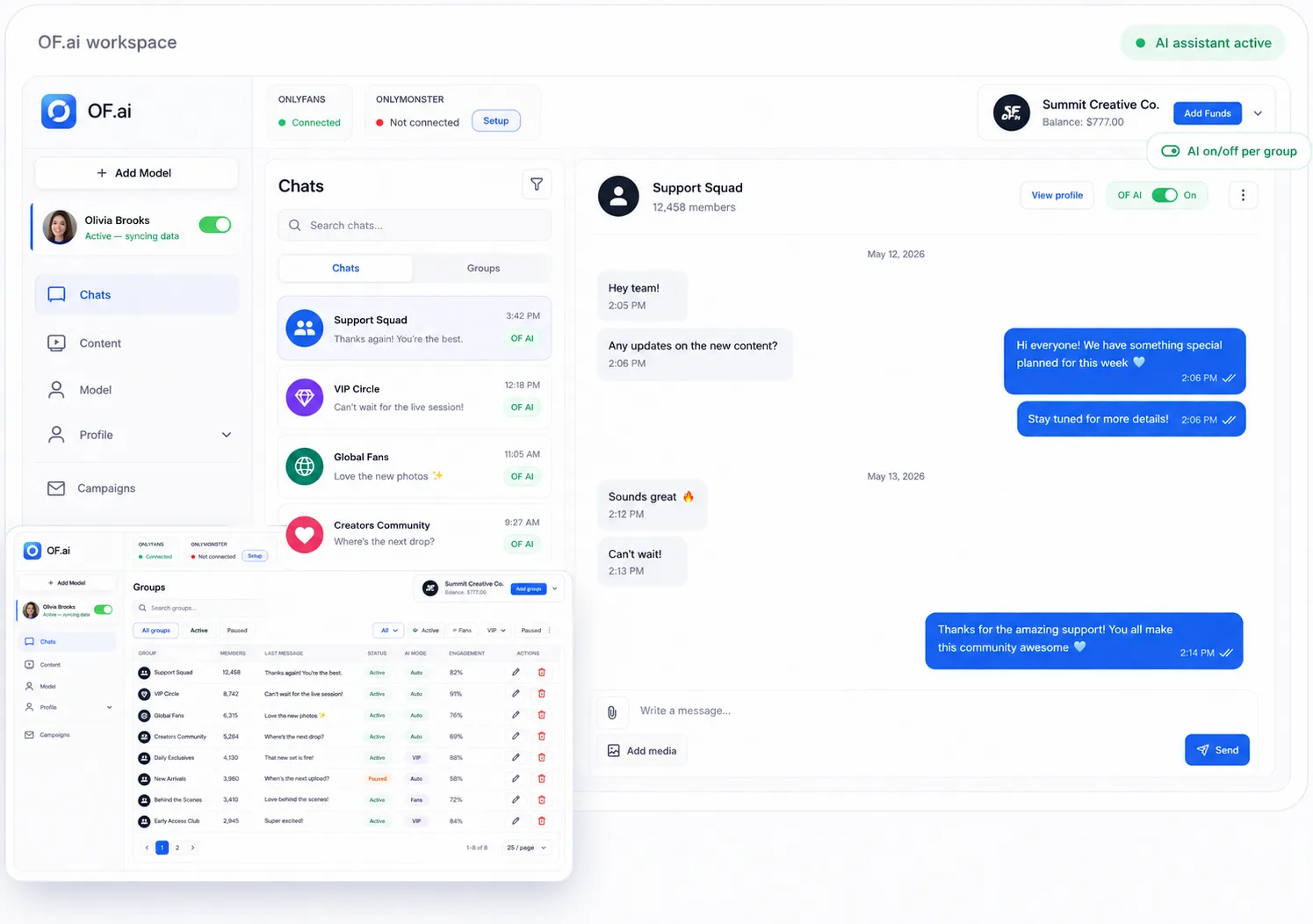
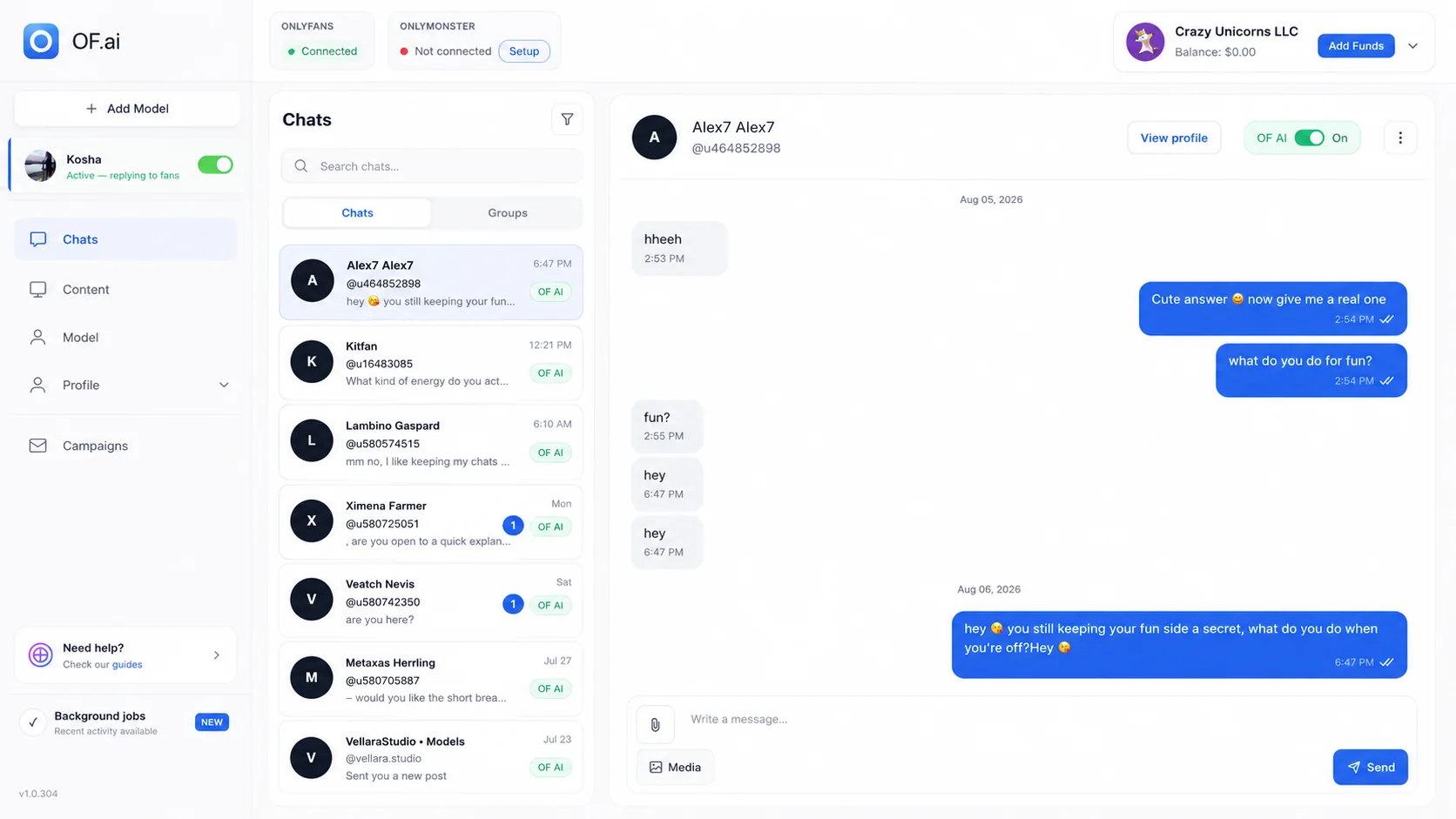
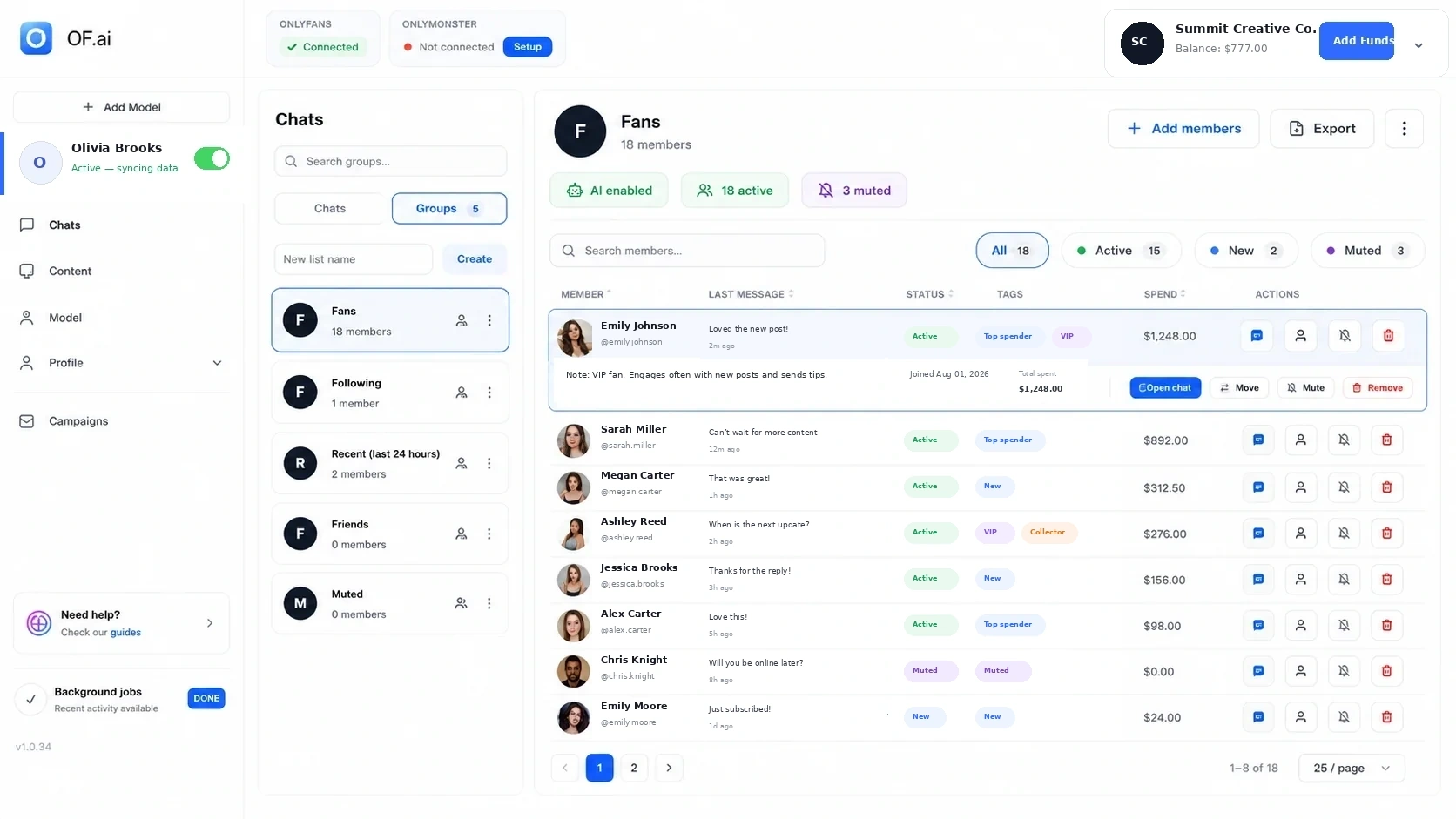
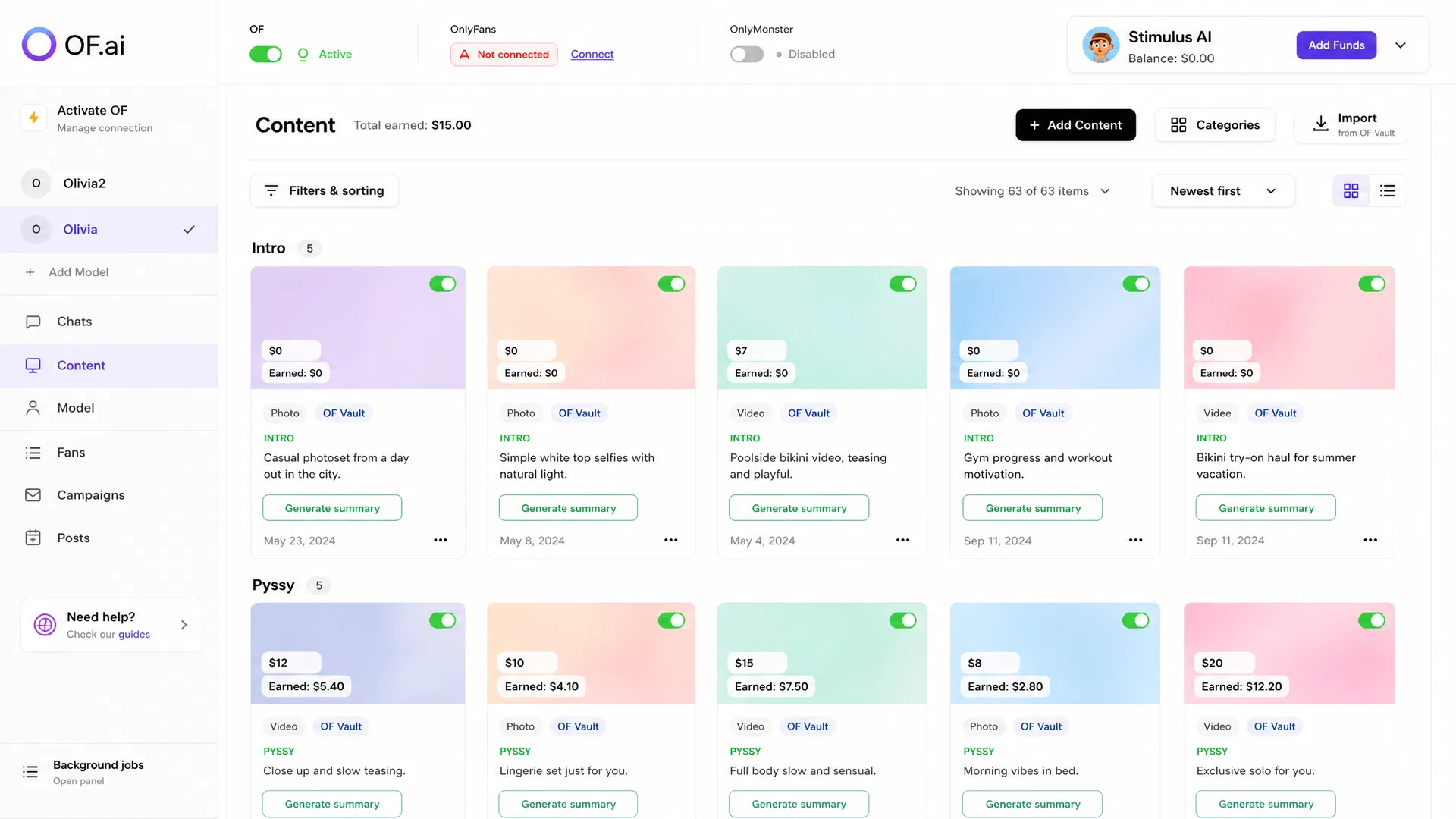
- Keep chat, fan context, approved content, and creator rules tied to the same workflow.
- Let operators take over one fan conversation without disabling the rest of the system.
- Separate each creator's persona, content, fan context, and team permissions.
- Start with one model and measure lookup time, corrections, review work, and handoffs before expanding.
What an Operator Should See Without Opening Five Tools
A useful management workspace should answer the questions an operator has before the next action: who is this fan, what happened recently, which creator rules apply, what content is approved, what price or offer is configured, and whether the conversation is still automated or already owned by a person.
OF.ai is designed to keep those inputs close to the thread, as the operator interface walkthrough shows. The exact context available depends on the connected account and integration, so missing data should remain visibly missing instead of being filled with a guess.
- Current conversation and recent available history
- Fan tags, notes, and purchases in the CRM, or stated preferences when the source exposes them
- Approved creator content with explicit descriptions, categories, and configured prices
- Creator persona, boundaries, conversation stage, offer rules, and escalation settings
- Per-fan AI control plus immediate human takeover
- Clear account and model separation for multi-creator teams
The Product Should Make Handoffs Smaller, Not Create a New Dashboard Job
Management software earns its place when the team spends less time reconstructing context and more time making the decision that actually needs judgement. A new dashboard is not an improvement if operators still copy fan notes, search for the right asset, ask a manager which price is current, or lose ownership when a conversation escalates.
During a pilot, count the steps the software removes and the steps it creates. Review minutes, correction work, exception handling, and configuration maintenance belong in the evaluation — and in the analytics you track for the account — just as much as the visible automated actions.
| Workflow friction | What to look for in software | What to measure |
|---|---|---|
| Context lookup | Fan context available beside the conversation | Time spent searching or switching tools |
| Content lookup | Approved library tied to the correct creator | Wrong-asset corrections and lookup time |
| Escalation | One-click or clear takeover with ownership | Takeover rate and unresolved handoffs |
| Configuration | Creator-specific rules with visible ownership | Repeated fixes caused by unclear rules |
| Multi-model work | Separated accounts, content, personas, and permissions | Cross-account mistakes and manager review time |
Solo Creator and Agency Workflows Need Different Controls
A solo creator usually wants fewer repetitive inbox tasks while staying close to sensitive conversations. An agency has the same need plus what OnlyFans agency software has to provide: account separation, permissions, repeatable onboarding, QA ownership, and a way for managers to see where a workflow needs attention without reading every message.
| Decision area | Solo creator | Agency |
|---|---|---|
| Chat control | Take over important fans directly | Assign review and escalation ownership by model or team |
| Context | Keep one creator's fan history easy to inspect | Prevent one model's fan context from leaking into another |
| Content | Use one approved library and configured offers | Keep each model's assets, prices, and rules separated |
| Permissions | Keep account ownership and sensitive settings controlled | Limit who can change configuration or access each model |
| Measurement | Compare personal workload before and after | Compare the same operating definitions across representative models |
What OF.ai Consolidates — and What Should Stay a Specialist Tool
OF.ai consolidates the work that depends on the fan conversation: AI-assisted chat, fan memory, the approved vault with its price ranges, PPV offers, scheduled posts planned from the same library, team access and human takeover. These belong together because one reply can need all of them at once.
Keep the specialist parts of the wider OnlyFans tool stack for accounting, payroll, contracts, legal work, production and archival — jobs that do not get better by living beside the inbox. A smaller stack helps only when it makes ownership clearer, not when unrelated work is forced into one product.
Example: One Reply and the Five Things It Needs
A single reply to a fan can depend on five pieces of information, which is the practical case for keeping them in one workspace. The exchange below is an illustrative example, not a real conversation.
A fan who bought one video last month writes late at night: 'you said you'd have something new for me?'. Before answering, the operator or the AI needs the thread (what was promised), the fan's memory (what he bought and said he likes), the model's rules (what she does and does not offer), the approved vault (which new files exist and are cleared to send) and the price range she set for that category. With all five on one screen, the reply can name the right file at a price inside her range, or hand the thread to a person if the promise was something the vault does not contain. With five tools open, the usual result is a guess.
Common Mistakes When Moving to Management Software
The usual mistake when adopting OnlyFans management software is moving tools before deciding who owns each piece of information. These are the patterns that make a new workspace slower than the old spreadsheet:
- Keeping the old fan-notes sheet alive 'just in case', so two versions of every fan exist
- Importing the whole vault before anyone has approved and priced it, so nothing is safe to send
- Switching the AI on for every fan on day one instead of leaving VIPs and sensitive threads manual
- Giving every teammate access to every page because setting access per person felt slow
- Judging the product on one impressive demo reply instead of a week of ordinary threads
An OnlyFans Management Software Evaluation Checklist
OnlyFans management software can be evaluated against eight concrete checks, each of which can be seen working on one connected model before anything is rolled out.
- One thread view with the full conversation and the fan's history
- Per-model configuration, so one creator's persona and rules never reach another creator's fans
- A per-fan switch for the AI, and takeover by a person at any point
- Files sent only from the creator's own approved vault
- Prices inside a floor and a ceiling the creator sets per category, never prices the AI makes up
- Each OnlyFans account connected through a dedicated residential IP per account
- Prompt changes tested in a test lab before they reach live fans
- A clear statement of what the software does not do
Which OF.ai Layer Covers Which Management Job
OF.ai covers the conversation and selling side of OnlyFans management in two layers, plus the team controls around them; the rest of the job stays with specialist tools.
- Fan conversation, memory and takeover: AI Closer, free on every model in suggestion mode
- Priced offers from the approved vault: AI Closer as the paid selling layer
- Shift handoffs and exception queues for a team: team inbox controls for agencies
- Feed promotion, outside marketing and bookkeeping: specialist tools, kept separate
A One-Model Management Software Pilot
Choose one model whose workflow is representative enough to matter but contained enough to review closely. Before connecting anything, document the current process: which tools operators open, where they look for context, how content and offer details are checked, how a human takes over, and how much manager review is required.
Then run the same workflow in OF.ai with the creator's content, rules, context, permissions, and escalation configured. The buying decision should be based on whether the whole operating loop improved at the published AI Chatter and AI Closer prices, not on whether one automated reply looked impressive in a demo.
- Record the current tool chain and ownership for each step.
- Connect one creator and configure persona, boundaries, content, and escalation.
- Review ordinary conversations as well as obvious exceptions.
- Measure context lookup, corrections, takeovers, review minutes, and trusted commercial outcomes.
- Expand only after the new workflow carries the responsibility the old process handled.
FAQ
OnlyFans Management Software That Keeps the Workflow in One Place
OnlyFans management software is one workspace where a creator or agency runs chats, fan notes and approved content instead of juggling separate tools and a spreadsheet. It is for teams tired of switching tabs in the middle of a conversation. OF.ai keeps the thread, the fan's memory, the approved vault with its price ranges and the takeover button on one screen; accounting, payroll and promotion stay in other tools.
What are OnlyFans management software and management tools?
OnlyFans management tools are the separate pieces — a chat tool, a fan CRM, a content library, reporting — and OnlyFans management software is one workspace that holds them together. The value is that a reply, a fan note and a priced file are handled in the same place by the same person. Which pieces a product really covers is worth checking screen by screen.
What does OF.ai put in one workspace?
OF.ai puts the fan conversation, each fan's memory, the creator's approved vault with price ranges per category, her persona and rules, the per-fan AI switch and human takeover in one workspace. It does not hold accounting, payroll, contracts or feed promotion.
Is OF.ai only for agencies?
No. A solo creator can use the same workflow controls for one account. Agencies add model separation, permissions, review ownership, and cross-account oversight.
Can OF.ai replace my entire agency software stack?
No. OF.ai replaces the chat, fan-memory and selling part of an agency stack; accounting, payroll, legal, content production and archival stay in specialist tools. Plan the stack as one core workspace plus a few deliberate specialists.
How should I compare management platforms?
Run the same representative workflow in each system and count context lookup, corrections, takeovers, review work, permissions, content handling, pricing clarity, and the commercial measures your business already trusts.
Can I test one model first?
Yes. A one-model pilot makes it easier to expose failure modes and measure whether the new workspace actually reduces fragmented work before a wider rollout.
Is there free OnlyFans management software?
OF.ai's AI Closer is free on every model in suggestion mode, and it runs inside the same workspace: chats, fan memory, the per-fan AI switch and takeover. Selling and campaigns by itself is automatic mode, which is paid.
What should OnlyFans management software do for a solo creator?
Take the repetitive part of the inbox off her hands while she keeps the conversations that matter. For a solo creator that means her own voice and boundaries in the replies, memory of each fan, and a one-click way to take any thread back, rather than agency features such as roster views.
AI Closer for OnlyFans.
Suggestions free. You send.
In suggestion mode the AI drafts every reply in your persona and tone of voice, tips and paid content from your vault at your prices included. You edit and send each one yourself, and the AI learns from your edits. Free on every model; switch to the paid automatic mode only when you want the AI to answer by itself.